Tuesday, June 15, 2010

Week 7(17-21 MAY 2010)

This week I was assigned to find the Contact Center vendors (Premise-based) and also Contact Center vendors (Hosted). I was asked to find the details such as:

  • the product's name
  • the best virtual person
  • URL of the product's website
  • features of the product
  • and also the product summary

Premise-based Call Center Technology Historically, call center have been built on PBX equipment that is owned and hosted by the call center operator. The PBX might provide functions such as Automatic Call Distribution, Interactive Voice Response, and skills-based routing. The call center operator would be responsible for the maintenance of the equipment and necessary software upgrades as released by the vendor.

Some of the companies for this category are :
  1. eON Communication
  2. Stratasoft
  3. Vertical Networks
  4. APEX Voice Communications
  5. Avaya
  6. Cantata
  7. ClickFox
  8. Spoken
  9. Prosodie
  10. Convergys

Hosted Call Centre are those which we do not need
to buy, just need to subscribe like the one we tested with UNICEED product.

Some of the findings are as below :

  1. West Corporation
  2. Voxify
  3. Voxeo
  4. Volt Delta
  5. SoundBite
  6. Resolvity
  7. CSG Systems
  8. Microsoft
  9. Message Technologies Inc.
  10. LiveVox


Week 6 (10-14 MAY 2010)

This week my research continues on Text-To-Speech Plug Ins, Speech-To-Text Plug Ins and also Predictive Dialing. Other than that, I also did some researxh on TTS and STT Plug Ins using Asterisk. The main reason of this task is to find and survey the prospective products that can be used by our companies. It is also purposed to survey the price and usage of these products and determine the benefits of this product for the company.

TEXT-TO-SPEECH (TTS) SOFTWARE


Text-to-speech (TTS) is a type of speech synthesis application that is used to create a spoken sound version of the text in a computer document, such as a help file or a Web page. TTS can enable the reading of computer display information for the visually challenged person, or may simply be used to augment the reading of a text message. Current TTS applications include voice-enabled e-mail and spoken prompts in voice response systems. TTS is often used with voice recognition programs. There are numerous TTS products available, including Read Please 2000, Proverbe Speech Unit, and Next Up Technology's TextAloud. Lucent, Elan, and AT&T each have products called "Text-to-Speech."

In addition to TTS software, a number of vendors offer products involving hardware, including the Quick Link Pen from WizCom Technologies, a pen-shaped device that can scan and read words; the Road Runner from Ostrich Software, a handheld device that reads ASCII text; and DecTalk TTS from Digital Equipment, an external hardware device that substitutes for a sound card and which includes an internal software device that works in conjunction with the PC's own sound card.


Figure : Demo of TTS that provides visual.

This TTS can be found using this URl : http://vhss-d.oddcast.com/admin/sitepalV5.php.
TTS are normally used to read out from a text. It can be used to read text from a Word file, Powerpoint file or even Excel file. IT is very useful from who are difficulties in seeing and so on. However, in the context of my company, TTS is used to create human like voices to be used as operator person whenever you call a company.

My job is to edit these voices using the WAVEPAD EDITOR software that we have learnt from week 1 of my industrial training. Certain TTs does not provide the exact voice that we wanted. This is why we can use the wavepad editor to change the pitching, amplitude and other elements of the voice. Using this editor, I am allowed to attach or detach certain voices to or from each other.


Figure : Process that involved in TTS


SPEECH-TO-TEXT (STT) SOFTWARE

Ability of computer systems to accept speech input and act on it or transcribe it into written language. Current research efforts are directed toward applications of automatic speech recognition (ASR), where the goal is to transform the content of speech into knowledge that forms the basis for linguistic or cognitive tasks, such as translation into another language. Practical applications include database-query system information retrieval systems, and speaker identification and verification systems, as in telebanking. Speech recognition has promising applications in robotics, particularly development of robots that can “hear.”

However, in my company we seldom use this software as the process of my work does not involve this software. this software is not widely used although its beneficial to people who are unable to write or to make it easier for deaf people to understand certain conversation to be in back and white copy..!!!


Figure : The process of changing speech-to-text.


Figure : Application on STT


PREDICTIVE DIALING
A predictive dialer is a telephone control system that automatically calls a list of telephone numbers in sequence, screening out no-answers, busy signals, answering machines and disconnected numbers while predicting at what point a human caller will be able to handle the next call. Predictive dialers are commonly used for telemarketing, surveys, appointment confirmation, payment collection and service follow-ups. Sellers of predictive dialer systems claim that they greatly increase caller productivity. The phone calls you receive from "no one there" are often predictive dialer calls in which a manual caller isn't ready yet. Not to be confused with an automatic dialer, a predictive dialer is programmed to predict when a human caller is available to pick up a call. Predictive dialers can also measure the number of available agents, available lines, average handle time and other factors to adjust outbound calls accordingly. This measurement delivers a high level of mathematically efficiency to use in call centers. A related system is a lead generator, which dials a list of telephone numbers and, when a live voice answers, delivers a recorded message.


Figure : Predictive dialing. It will guess which is online at the particular time so that the caller do not have to wait long to get to an agent.


This mode is widely used because it is, without doubt, the most productive for agents. Predictive dialers use historical statistics and sophisticated algorithms to calculate agent availability. Thus, based on past trends, the solution will know exactly how many dialing attempts and how much time are required to reach a live contact, as well as exactly when an agent will become available to take that next outbound call. Therefore, the dialer can start dialing to reach the next available customer/prospect even before an agent becomes available and connect this live contact as soon as or shortly after an agent becomes available. Since the predictive algorithm analyses a number of factors, including the number of available telephone lines and agents and the probability of a call not being completed (e.g., busy signal, no answer, etc.), it becomes impossible to establish a "magic" rule to determine the number of agents required for the planning algorithms of the predictive mode to select the perfect rhythm. However, a dynamic rule can be constructed according to three closely linked criteria; in order of importance, these are:
  • call length
  • length of after-call wrap-up
  • the number of agents for one campaign and its sublists
When properly used, predictive dialing can have a dramatic effect in the contact center. Normally, the busy rate for agents between manual and predictive modes increases by 30% to 60%.
Figure : Difference between wait time and talk time using predictive dialing and also manual dialing.

Monday, June 14, 2010

Week 5 (3-7 MAY 2010)

For this week, I was given the R&D task where I was supposed to research on three topics that would be Automatic Call Distribution (ACD) , Call Queue System and a little research in the product that uses this system such as AVAYA, GENESYS, CISCO and so on.


Call Queue System

Queues consist of :
  • Incoming calls being placed in the queue.
  • Members that answer the queue (extensions or users that login as agents).
  • A strategy for how to handle the queue and divide calls between members.
  • Music played while waiting in the queue.
  • Announcements for members and callers.

In Asterisk, queues are defined in queues.conf or in dynamic real-time. The latter allow storing queue configuration in a database so that changes are immediately available for new callers without the need for an explicit reload.

  • Agents are the people (or person) that answers call(s) that have been placed into a specific Queue. An agent logs in indicating that s/he is now ready to take calls. Asterisk transfers an inbound call to a queue, which is then in turn transferred to an available agent.
  • Members are those channels that are active answering the Queue. It can be agents or normal channels, like "sip/snom23"

Figure : Call Queue System

Usually, a call queue works as below:

§ Calls are queued

§ Agents answer the queue (logged in agents)

§ A queuing strategy to distribute the calls is used.

§ Music on hold is played while the caller waits.

§ Announcements can be made to callers, warning about waiting time.

What are Advanced Call Queue and Group Functions?

Traditional telephone systems either return a busy tone or direct the call to a voice mailbox when the intended recipient does not pick up. Advanced call queue and group functions in VoIP PBX systems will receive the call and put it on queue until the intended recipient is able to take the call. While waiting, the caller is told the queue status of their call, how many callers there are ahead of them or an estimated number of minutes before their call can be answered.

Automatic Call Distribution (ACD)

  • Automatic Call Distributor (ACD), also known as Automated Call Distribution, is a deviceor system that distributes incoming calls to a specific group of terminals that agents use. It is often part of a computer telephony integration (CTI) system.
  • Automatic Call Distributor: A computerized phone system that responds to the caller with a voice menu and connects the call to the appropriate agent. It can also distribute calls equally to agents. ACDs are the heart of call centers, or contact centers, which are widely used in the telephone sales and service departments of all organizations.

How It Works?

The system consists of hardware for the terminals and switches, phone lines, and software for the routing strategy. The routing strategy is a rule-based set of instructions that tells the ACD how calls are handled inside the system. Typically this is an algorithm that determines the best available employee or employees to respond to a given incoming call. To help make this match, additional data are solicited and reviewed to find out why the customer is calling. Sometimes the caller'scaller Id or ANI is used; more often a simple Interactive Voice Response is used to ascertain the reason for the call.


There are several stages to consider with an ACD system :

1. The system architecture and how calls are handled by the system and controlling software.

2. The decision processes of the controlling software

3. The real time management of the system

4. The management reporting system.

5. Making the system failsafe.


GENESYS

Genesys Interactive Insights is a Web-based query and reporting application that provides a complete business-oriented view, based on role, for contact center managers, business users, supervisors, and agents. These users can measure past interactions in their own terms and collaborate to improve performance using common reports. Interactive Insights draws on the data stored in Genesys Info Mart, which contains complete customer interaction and contact center agent details across all media types. This contact center reporting tool can also capture data outside the contact center, for visibility into previously “untrackable” business activities and processes.


AVAYA

Avaya Contact Centre Express is a multi-channel, high-volume software solution designed specifically for the Intelligent Routing and Computer Telephony Integration (CTI) needs of medium-sized Contact Centres.


CISCO

Cisco Unified CME B-ACD provides automatic answering and call distribution for calls through the use of interactive menus and local hunt groups. Each Cisco Unified CME B-ACD application consists of one or more auto-attendant (AA) services and one call-queue service.


Friday, June 11, 2010

Week 4 (26-30 April 2010)

The previous week, I did research on IVR Customization, Find Me/Follow Me Services and also 3-Party Voice Conference. This week I was given a task to put the research into application by testing out the Find Me/Follow Me services and also the 3-Party Voice Conferencing Service.


Before carrying out these test on physical IP phone and also soft phones, I was asked to configure the settings in the phone so that it is usable and I may make a full use of it when it comes to do the application of the researches that has been done.

Basic Configuration for Soft Phones

1. Create an user extension in asterisk server : My user extension is 2001.

2. Download Soft phone : Download zoiper and x-lite softphone from internet.

3. Configure Soft phone : Click preferences and create a new SIP account.

4. Test Calls : Dial to other user extension. Able to call 2 user at one time by using line 1 and 2.


Basic Configuration for Physical IP Phone

1. Create an user extension in asterisk server : My user extension is 2001.

2. Configure IP phone : Settings made in Linksys SPA 921 IP phone server.

3. Test Calls : Dial to other user extension. Able to call 2 user at one time by using line 1 and 2.


After these configuration was done, I was able to carry on with the configuration of Find Me/Follow Me services. As explained in the previous post, Find ME/Follow Me service is often used in IP telephony services. Find Me service works when phone numbers are called simultaneously where as Follow Me service works when phone numbers are called sequentially.

Configuring Find Me/Follow Me Services

1. Create an user extension in file editor : The user extension is created by typing coding into the config files.

2. Edit Ring Groups : Select strategy (Ring all/ Ring in order). Ring all is Find me which rings simultaneously. Ring in order is Follow me which rings sequentially. User extensions in available channels are sent to ring group members.

3. Test Calls : Subscriber 1 calls in, rings simultaneously or sequentially on subscriber 2, 3 and 4's
phone.

The settings were done in the ASTERISK SERVER of my company. By clicking on the Ring Groups tab, I was able to edit the group any way I wanted it to be. For example if I would like to have the numbers to be rang simultaneously, I edit the Ring Group to be RING ALL. On the other hand, if I wanted the numbers to rang sequentially, i edit the group to be RING IN ORDER. The numbers that I can found in this server to be edited in the group will be the username of the registered agents in this companies. For example, my username is 2001, and my colleagues username could be 2002, 2003 and also 2004. I used all theses username to edit the ring group and tested out weather the calls can be directed to do the Find Me or Follow Me service.

Figure : Edit Tab in the Asterisk Server


Figure : The configuration is done here.


Configuration for 3-Party Voice Conferencing

1. Create an user extension in file editor : The user extension is created by typing coding into the config files.

2. Configure Conference Bridge Extensions : New extension is created by clicking new in conference bridges and edit conference room options.

3. Test Calls : Test call from subscriber 1 to subscriber 2 and subscriber 3 able to listen to the conversation.

The configuration for Conferencing also can be done in the company's ASTERISK SERVER. Just like Find Me/Follow Me services, I can edit the group for conferencing and able to choose which agent will be included in the conference group. The main idea about this conferencing service is that, any number which like to join the conference will have to call a random number that was chosen to be the username for the specific conference group. Once they dial this this number, all they have to do is to speak out their name and automatically that particular person is included in the conference session.
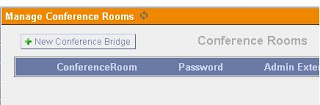
Figure : Create Conference Bridge
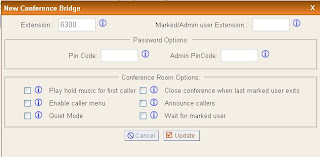
Figure : Editing the group for conferencing

Friday, May 28, 2010

Week 3 (19-23 April 2010)

Continuing last week's incomplete work, I carried on with the practical test on IP phone. In order to use the physical IP phone which was actually Linksys SPA 912, I had to configure the settings in the server provided. each physical phone has its own server which was provided by SIPURA. After configuring, calls can be made to and from a softphone.


Figure : Configuration in SIPURA (each IP phone as its own server )


Once I am done with that task, my supervisor gave another three topics to do research on. The topics are IVR Customization, Find Me/Follow Me and also 3-Party Voice Conferencing.


IVR Customization


IVR stands for Interactive Voice Response. It is the technology that we use everyday when we call a bank or a hospital or any large business. It is the voice activated prompts that brings us to the correct person or gives us the answer we want. IVR automates inbound call routing and fosters self-service.The whole process of placing an order by the caller, and checking the status with the help of the order number can be automated with the customized IVR flow. During wait time or hold time, messages about other products and promotional offers can also be played allowing you to capitalize on cross-selling and up-selling opportunities.


Figure : IVR Customization Application


Find Me/Follow Me


Find me and follow me are two call forwarding services that are commonly used in conjunction with each other. Find me service allows the user to receive calls at any location; follow me service allows the user to be reached at any of several phone numbers.


Find me / follow me is often used in IP telephony. In some systems, the user is assigned a virtual phone number. When that number is dialed the system routes the call through a user-defined list of numbers. The numbers may be called simultaneously or sequentially, either in a preferred order or in accordance with the user's scheduled activities and locations. Once the list has been called and no connection made, the system may route the call to voice mail.

In a unified messaging system (UMS), find me / follow me may route messages among VoIP, voice email, fax and text messaging applications.


Figure : Auto attendant/IVR, find me/follow me and failover support.


3-Party Voice Conferencing


Voice conferencing is one of the most critical elements of group communication. Excellent voice quality is essential for both voice-only calls and visual communication environments, ensuring that everyone can clearly hear and be heard to improve productivity and deliver a seamless, natural communications experience.
Below are the steps to setup a third-party conferencing service to be the main audio conference solution:

1. As the host, enter the meeting room.
2. Select the Meeting menu.
3. Select Set phone conference options. The Phone Conference Options appears.
4. Select Other.
5. Enter the conference number.
6. Enter the participant code.
7. Enter the Moderator code.
8. Click OK.

Week 2 ( 12 - 16 APRIL 2010)

This week, I did more research on Session Initiation Protocol (SIP) as this will be one of the most important criteria in more work to come in the future.

The Session Initiation Protocol (SIP) is an IETF-defined signaling protocol, widely used for controlling multimedia communication sessions such as voice and video calls over Internet Protocol (IP). The protocol can be used for creating, modifying and terminating two-party (unicast) or multiparty (multicast) sessions consisting of one or several media streams. The modification can involve changing addresses or ports, inviting more participants, adding or deleting media streams, etc... Other feasible application examples include video conferencing, streaming multimedia distribution, instant messaging, presence information, file transfer and online games.


SIP responses are the codecs used by SIP for communication. The codecs that I focused was g729, g726 and g711.


Figure : SIP Configuration


After the research on SIP was done, more practical test was done thoroughly on this topic. The company, Superceed Sdn Bhd has its own Asterisk Server. All the settings for the SIP can be done here. Therfore, I was asked to create an SIP account for my own in the Asterisk Server provided. Using this account, I was able to proceed to conduct other practical test.

This week, using the account created, I used to test IP phone that was downloaded online. Ther are two types of IP teelphony, physical IP phone and also SIP phone.


Figure : Zoiper and XLite Softphones

Figure : Physical IP phone


The softphones can be downloaded from the net meanwhile the physical IP phone was provided by the company. Using these Ip phone and the SIP account created from the Asterisk Server, I created an dextension to b registered in the IP phone. The main objective of this task is to make phone calls from one extension to another exxtension using IP phone. Other than that, I also had the chance to experiment various ways to use the softphone in multi ways and was able to set the mailbox number for the IP phone which would be 8888.

Besides that, I also learned about Host Media Processing (HMP). Dialogic HMP software performs media processing tasks on general-purpose servers without requiring the use of specialized hardware.

The next day, I was exposed to Welltech 6500 and Wellrec 5600. Welltech is the IP PBX system to operate on a variety of VoIP applications. The Welltech WellCIP 6500 series SIP Telephony server is the best choice to convergence VoIP network which convert the requirements from enterprise to service provider. Wellrec 5600 is a VoIP recoder for Welltech SIP network architecture.

The last day of the week, I have learnt bout Interactive Voice Response (IVR).Interactive Voice Response (IVR) is a technology that allows a computer to detect voice and dual-tone multi-frequency signaling (DTMF) keypad inputs. IVR technology is used extensively in telecommunication, but is also being introduced into automobile systems for hands-free operation. Current deployment in automobiles revolves around satellite navigation, audio and mobile phone systems. In telecommunications, IVR allows customers to access a company’s database via a telephone keypad or by speech recognition, after which they can service their own inquiries by following the instructions. IVR systems can respond with pre-recorded or dynamically generated audio to further direct users on how to proceed. IVR systems can be used to control almost any function where the interface can be broken down into a series of simple menu choices. In telecommunications applications, such as customer support lines, IVR systems generally scale well to handle large call volumes.